Entry Level Tech Jobs Remote: Your No-Degree Playbook
Land entry level tech jobs remote without a degree. Our playbook shows you what skills, projects, and job search strategies you actually need to get hired.
Most advice about entry level tech jobs remote is bad. It either says “just learn to code” or pretends every remote posting is a golden ticket for beginners. Neither is true.
If you're a STAR, skilled through alternative routes, you do not need a four-year degree to break into tech. You do need a smarter plan than the average applicant. Remote work changed the playing field fast. The U.S. Bureau of Labor Statistics reported that 35.4% of employed people were teleworking because of the coronavirus on May 29, 2020, which helped make remote work a lasting part of the labor market and a real factor in entry-level tech job searches, as noted in this remote work overview for entry-level tech roles.
That matters for one reason. You're no longer limited to whatever companies happen to be within driving distance.
The old gatekeeping logic is fading. Employers still screen hard, but a lot of them now care more about whether you can solve problems, communicate clearly, and show proof than whether you sat in lecture halls for four years. That's the core idea behind skills-based hiring, and it's the mindset you need when you approach this market.
This playbook is built for people who are tired of vague motivation and want a practical path. Not fantasy. Not hype. Just what gives you a shot.
Table of Contents
- Forget the Degree Let's Get You a Remote Tech Job
- Your No-Degree Skill Stack That Gets Noticed
- The Hunt How to Find Jobs and Actually Get a Reply
- Nailing the Remote Interview From Your Living Room
- You Got the Offer Now What
Forget the Degree Let's Get You a Remote Tech Job
The fastest way to stall your job search is to obsess over what you don't have. No degree. No brand-name internship. No fancy network. Fine. That's not your angle anyway.
Your angle is this. You're going to look more useful than the candidate who only knows how to sound qualified.
A lot of people still talk about remote work like it's a temporary pandemic leftover. It isn't. It changed how companies hire and how candidates search. That matters a lot for beginners in tech because access widened. Junior candidates outside major tech hubs can now compete for support, QA, data, and software-adjacent roles without relocating first.
Practical rule: Stop asking, “Can I break into tech without a degree?” Start asking, “Which role can I prove I can do in the next 60 days?”
That question changes everything.
If you chase the broad label of “tech,” you'll spin your wheels. If you target one role family and build evidence around it, you start looking credible fast. Remote hiring rewards clarity. Recruiters don't want to guess where you fit. They want to see a clean match between the job title, your resume, and your examples.
Pick the lane before you build the resume
A lot of no-degree candidates do this backward. They build random skills, collect half-finished courses, then apply everywhere. That creates a messy story.
The better move is to pick a first role based on three things:
- What you can learn fast
- What you can demonstrate publicly
- What employers already hire for without requiring a CS degree
That's why the best first step usually isn't “become a software engineer” in the abstract. It's something narrower and more testable, like IT support, QA testing, junior admin work, or support-heavy technical roles.
Top Entry-Level Remote Tech Roles No Degree Needed
Independent career guidance keeps pointing STARs toward help desk, IT support, and network support as realistic entry points, with certifications such as CompTIA A+ or Network+ and hands-on projects able to stand in for a computer science degree in some cases, as discussed in this career guidance on viable no-degree tech paths.
| Role Title | Core Responsibilities | Key Skills & Certifications | Typical Salary Range (Entry-Level) |
|---|---|---|---|
| IT Support Specialist | Reset accounts, troubleshoot devices, document tickets, help users solve access and software issues | Ticketing systems, troubleshooting, customer communication, CompTIA A+ | Varies by company and location |
| Help Desk Analyst | Handle inbound support requests, escalate technical issues, guide users through fixes | Remote support tools, communication, operating systems basics, CompTIA A+ | Varies by company and location |
| Junior QA Tester | Test web apps, log bugs, reproduce issues, verify fixes | Attention to detail, test cases, bug reporting tools, basic product sense | Varies by company and location |
| Junior Salesforce Administrator | Update records, support workflows, manage basic user requests, maintain CRM hygiene | Salesforce basics, documentation, stakeholder communication, Salesforce training | Varies by company and location |
| Network Support Technician | Monitor connectivity issues, assist with setup, troubleshoot routine network problems | Networking basics, CompTIA Network+, diagnostics, documentation | Varies by company and location |
| Technical Support Representative | Help customers use software, troubleshoot product problems, explain steps clearly | Product knowledge, empathy, troubleshooting, written communication | Varies by company and location |
How to choose without overthinking it
If you like solving practical problems and helping confused users, start with IT support or help desk. These roles reward patience, communication, and step-by-step troubleshooting. They're also a strong launchpad into systems, cloud, security, or networking later.
If you're detail-obsessed and like catching mistakes, QA is a better lane. If you enjoy organized systems and business tools more than raw coding, admin roles inside platforms like Salesforce can be a smart entry point.
And if your dream is eventually working from different places, it helps to understand what remote life looks like beyond Instagram nonsense. This explainer on what is a digital nomad today gives useful context on the lifestyle side without romanticizing it.
One more thing. Don't confuse “remote” with “work from anywhere.” Some roles are remote only within certain states or countries. Some require training on-site. Some say entry-level but actually want previous experience. You can find more degree-optional remote paths in this roundup of best remote jobs without a degree, but the key move is still the same. Pick one lane first.
The first role is a bridge, not a forever identity.
Your No-Degree Skill Stack That Gets Noticed
Hiring managers do not care that you watched 40 hours of tutorials. They care whether you can show work, explain your decisions, and prove you can finish something.
That's why your no-degree strategy has to be evidence-first.
For beginners chasing remote tech roles, the strongest benchmark is proof of work. Guidance for entry-level remote jobs recommends a targeted certification, a small portfolio of 2–3 polished projects, and proof of real-world troubleshooting or support work. It also notes that a typical remote job search is often cited as 3–6 months, which is a useful reminder that this takes consistency, not panic-applying, in this entry-level remote jobs guide.
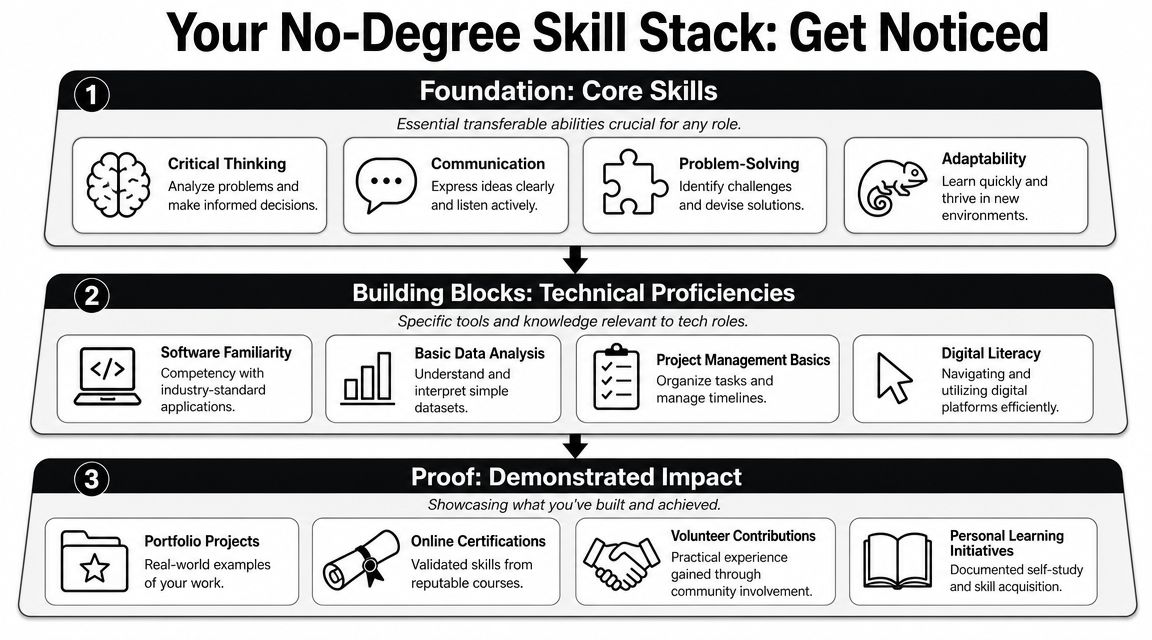
Proof beats potential
Your stack should have three layers.
First, foundational strengths. Can you communicate clearly in writing? Can you troubleshoot without getting flustered? Can you document what happened and what you tried? Remote employers care about this a lot because no one can read your mind through Slack, Zoom, or Jira.
Second, technical basics tied to one role. Not everything. Just the tools and concepts that show up in the jobs you want.
Third, visible proof. This is the part often overlooked.
Use this structure:
- One certification: Pick one credential that directly supports your lane. For support, CompTIA A+ makes sense. For networking, Network+ can help. Don't stack random certs just to feel productive.
- Two or three polished projects: Finished, documented, and easy to review.
- One real-world signal: Volunteer tech help, church AV support, fixing devices for a local business, helping a nonprofit with spreadsheets, anything that shows responsibility and follow-through.
What a polished project actually looks like
A polished project is not the most advanced thing you can build. It's the clearest proof that you understand a problem and can explain your solution.
For an IT support candidate, a good project could be a mock troubleshooting knowledge base. Include common user issues, diagnostic steps, likely causes, and resolution notes. That shows process, empathy, and documentation.
For QA, create test cases for a real app, log sample bug reports, and explain how you reproduced the issue. For a junior software path, build something small but complete. Clean README, setup instructions, screenshots, and a short write-up on tradeoffs.
If a recruiter needs ten minutes to figure out what your project does, your project is not helping you.
Build a portfolio people can skim in minutes
Your portfolio doesn't need to be fancy. It needs to be easy to scan.
Include:
- A short intro: One sentence on the role you're targeting.
- Project summaries: What problem you solved, what tools you used, what you learned.
- Screenshots or demos: Make it visual.
- Links that work: GitHub, live demo, docs, or walkthrough.
- Contact info: Obvious, not hidden.
If you need a simple way to present your work without wrestling with design or code, this guide on how freelancers can build a portfolio page is a solid shortcut.
People aiming at software roles should also study the difference between learning syntax and becoming employable. This breakdown on how to become a software developer without degree is useful because it focuses on capability, not credentials.
The Hunt How to Find Jobs and Actually Get a Reply
Spray-and-pray applications feel productive. They are not productive.
They're emotional busywork. You submit the same resume to fifty jobs, get ignored, then assume the market is broken. Usually your process is broken.
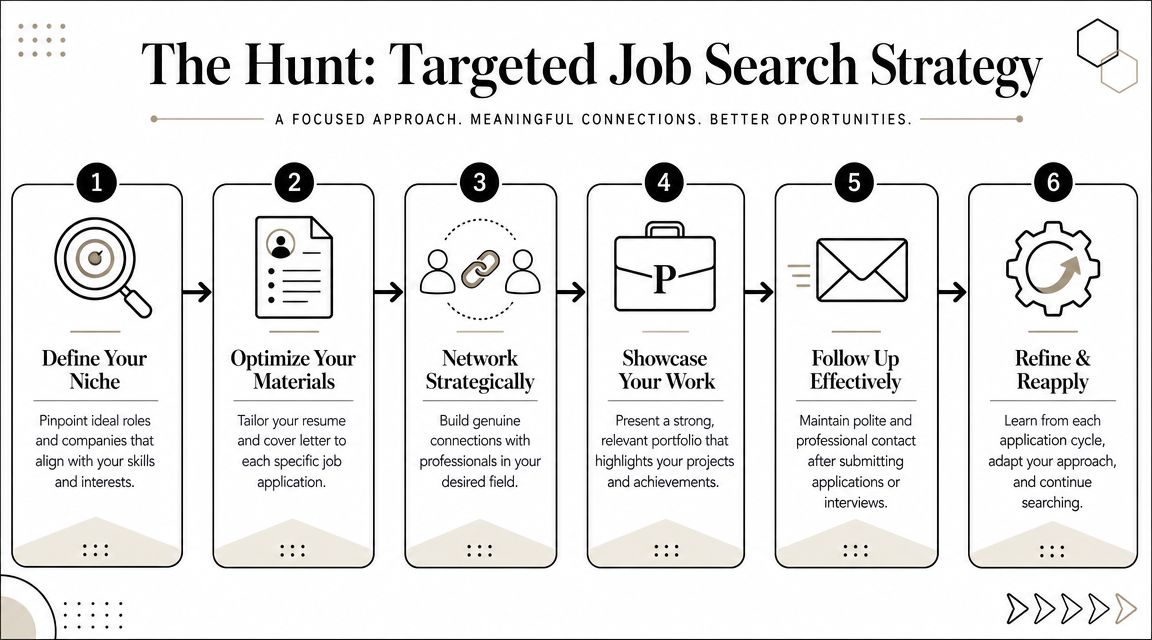
Stop applying like a lottery player
Remote entry-level hiring is broad, but it's also crowded. One data point makes that clear. Indeed currently lists 718 remote entry-level information technology openings in one search category, yet a 2025 analysis cited by Interview Query reported that 94% of tech hiring managers expect prior related work experience even for entry-level roles, and roughly 50% of entry-level postings in that dataset asked for 2–3 years of experience, as summarized in this analysis of the modern entry-level tech market.
That doesn't mean you're locked out. It means you need to package your projects, certifications, and adjacent experience as real evidence.
Read the job post like a skeptic
A job title can lie to your face.
“Entry-level remote” might mean:
- Remote after training: The listing says remote, but the first few weeks are on-site.
- Remote in name only: You must live in one state, one metro, or within commuting distance.
- Entry-level with filters: They'll still prefer candidates who already did similar work somewhere else.
- Support role disguised as engineering: Read the responsibilities, not just the title.
One example from a remote trainee listing required on-site training in weeks 1, 2, 6, and 7 even though it was marked remote, as shown in this Indeed job market example about hidden remote conditions.
Use a simple screen before you apply:
- Check the location line. Look for state restrictions.
- Check the training details. Search the posting for “on-site,” “hybrid,” or “in person.”
- Check the experience wording. “Preferred” is fine. “Required” needs a closer read.
- Check the tasks. If your projects align with half the work, apply.
Use the tailor and follow-up method
One of the few job search tactics I recommend almost across the board is this. Build three role-specific resumes, use the best-fit version for each application, and then contact the recruiter on LinkedIn right after you apply. That “tailor + follow-up” workflow is presented as a practical way to improve response rates in this job search strategy video on role-specific resumes and recruiter follow-up.
Your three resume versions might look like this:
- IT Support version: troubleshooting, ticketing, user support, documentation
- QA version: test cases, bug tracking, product detail, reproducibility
- Junior software version: projects, GitHub, debugging, feature delivery
Then send a short LinkedIn message. Not an essay.
Hi [Name], I just applied for the [Job Title] role. My background is nontraditional, but I've built relevant projects in [area] and I'd love to be considered. Thanks for your time.
That's it. Clean. Direct. Human.
You should also keep your search organized. A “job lead” is not just a posting you glanced at. It's a trackable opportunity with a title, company, date, contact, and next action. This quick explainer on how to define job lead is worth adopting because it forces discipline.
Nailing the Remote Interview From Your Living Room
Interviews for remote jobs are weirdly unforgiving. A weak camera angle, bad audio, or rambling answer makes you look less ready than you are.
Clean that up first.

Your setup matters more than you think
You do not need an influencer studio. You need competence on screen.
Use window light or a lamp in front of you, not behind you. Put the camera at eye level. Test your microphone. Close random tabs. Silence notifications. Keep your background plain enough that nobody remembers it.
A lot of candidates ignore this because it feels superficial. It isn't. Remote employers are hiring someone they'll mostly see through a screen.
For a broader checklist, this job interview preparation guide has useful prep ideas you can adapt to remote interviews.
Turn projects into experience stories
Here, no-degree candidates win or lose.
A 2025 analysis cited by Interview Query reported that 94% of tech hiring managers expect prior related work experience even for entry-level roles. If you don't have formal tech experience, your interview answers must turn projects, certifications, self-study, freelance tasks, military work, customer service, or operations work into compelling examples.
Use the STAR format:
- Situation: What was happening?
- Task: What needed to be done?
- Action: What exactly did you do?
- Result: What changed because of your work?
A strong answer does not require a past office title. It requires a clear story.
Example:
I built a small support knowledge base after noticing friends kept running into the same laptop and login issues. I organized the problems by symptom, documented step-by-step fixes, and tested the instructions with nontechnical users. That taught me how to troubleshoot methodically and explain technical steps in plain language.
That answer works because it sounds like work. Because it was work.
A few practical interview questions show up constantly. This list of questions for job interview is worth rehearsing with your own examples, not memorized scripts.
Here's a helpful walkthrough to practice before the actual thing:
What to practice before interview day
Don't just prepare answers. Practice delivery.
- Record yourself: You'll catch filler words fast.
- Answer out loud: Silent prep creates fake confidence.
- Prepare one story per skill: teamwork, troubleshooting, conflict, learning fast, dealing with ambiguity.
- Bring questions: Ask about onboarding, team communication, training, and how success is measured.
Short, specific answers beat long, impressive-sounding monologues every time.
You Got the Offer Now What
Getting the offer is not the finish line. It's the point where you stop acting like a hopeful applicant and start acting like a professional making a decision.
Read the offer carefully. The salary matters, sure, but it's not the whole package. Look at benefits, equipment policy, remote setup expectations, start date, schedule, time-off structure, and whether the role is fully remote, location-bound remote, or remote-until-they-change-their-mind.
Read the whole offer not just the paycheck
If something is vague, ask. Don't fill in the blanks with optimism.
Ask questions like:
- What does onboarding look like?
- Is any travel or in-person training required?
- What tools will I use daily?
- How is performance measured in the first few months?
That last one matters a lot. It tells you whether the company knows how to onboard junior talent remotely.
Negotiate like a grown professional
Yes, you can negotiate your first offer. No, you do not need to turn it into a chest-thumping showdown.
Keep it simple and respectful:
Thank you. I'm excited about the role. Before I sign, is there any flexibility on compensation or benefits?
If they say no, you haven't ruined anything. If they say yes, great. You asked like a professional.
You can also negotiate non-salary items. Start date. Equipment stipend. Title clarity. Training support. Small improvements matter, especially in your first role.
Then once you accept, get organized fast. Put onboarding meetings on your calendar. Test your setup. Read every document they send. Show up early to calls. Ask clear questions. Take notes like your future promotions depend on them, because they kind of do.
Remote first impressions stick hard.
If you want a cleaner way to find degree-optional roles without digging through endless junk listings, check out HiredBySkill. It's built for STARs and focuses on skills-first hiring, so you can spend less time proving you deserve a shot and more time applying to jobs that already value what you can do.
Latest jobs
- Personal Support Worker — Bayshore
- Case Manager — Bayshore
- Nurse Tech/Unit Secretary - Cardiac/Telemetry - Part Time Days — Williamson Health
- Senior Data Engineer — Sightly Enterprises, Inc.
- Compliance Manager — Lodestar Claims & Risk Services
- Retail Field, Low Voltage &/Or Networking Technicians — Mobile Technologies Inc.
- Senior Claims Specialist - Workers Compensation — Lodestar Claims & Risk Services
- Initiativbewerbung (m/w/d) – Werde Teil unseres HORIZONT-Teams! — HORIZONT e.V.